


Yours to use
A personal budgeting file you can update at your own pace.


Monthly Budget Tracker — Excel Template

EXCEL WORKBOOK · MONTHLY BUDGET
Set your monthly budget, record spending and compare planned amounts with actual totals. Keep income, bills, savings and debt payments together in one workbook.
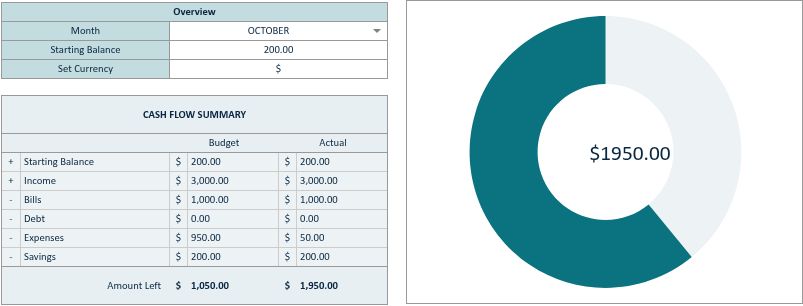
See how a $50 expense updates your budget ↓
Includes an XLSX workbook with READ ME (SETUP) and Budget tabs, plus an introductory PDF guide. Microsoft Excel is recommended and is not included. A computer is recommended for setup.
Other spreadsheet apps can change charts, dropdowns, checkbox behaviour and formatting. The workbook uses manual entries; it does not connect to your bank. Changing the currency symbol changes the display, not the amount.
Download your digital files after payment confirmation. One-time purchase for personal use. Save an untouched original and use a working copy for each month.
Need help? Contact Zunovexa. See the refund policy.
An XLSX workbook with READ ME (SETUP) and Budget tabs, plus an introductory PDF guide.
Microsoft Excel is recommended. Other spreadsheet apps may change the formatting, dropdowns or visual elements. Start with READ ME (SETUP).
Digital download after confirmed payment. No physical product is shipped. If you need help accessing your order, contact us.
A personal budgeting file you can update at your own pace.
See real previews, included files and software guidance below.
Follow the included instructions and begin with this month.
When bills, spending and goals sit in different places, reviewing your budget becomes another task on your list.
Monthly Budget Tracker — Excel Template brings your monthly figures together, so you can plan, enter actual amounts and review what changed.
Explore this tracker ↑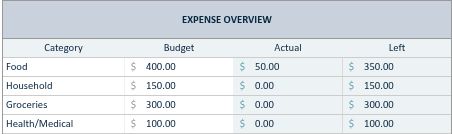
A practical spreadsheet for your income, expenses and priorities.
Enter your planned and actual income for the month.
Keep regular payments visible alongside your budget.
Record your figures under categories that make sense to you.
Include savings amounts in your monthly plan and review.
Include payments in your plan to understand their place in your budget.
Compare your planned and actual figures before planning your next month.
Both can help you plan. A spreadsheet keeps your figures and calculations together.
| Your routine | Paper budgeting | This digital tracker |
|---|---|---|
| Calculations | Work out totals manually | Built-in spreadsheet formulas |
| Changing a figure | Rewrite or recalculate | Update the relevant input cell |
| Plan vs actual | Create your own layout | Dedicated planned and actual amounts |
| Access | Keep your notebook nearby | Excel-compatible software required |
| Transactions | Enter manually | Enter manually; no bank connection |
Open your XLSX workbook in Microsoft Excel and read the READ ME (SETUP) tab before entering your figures.
The workbook uses standard Excel formulas. Compatibility and layout can vary with your app and version.

Start in READ ME (SETUP) for instructions. Move to Budget for your monthly income, spending and priorities.
A structured monthly layout keeps your budget categories and planned versus actual amounts easy to find.
The previews show the included workbook design. This purchase does not include a separate pack of colour themes.
Adapt the category labels and currency symbol to your routine, following the file instructions.
Use labels that reflect how you receive and spend money.
Choose your currency symbol. Changing it does not convert amounts.
Replace example inputs with your numbers while preserving the formulas.
Check the preview, included files and software requirements.
Complete your purchase and access your digital files after confirmed payment.
Read the setup tab, then enter your first monthly budget.
We create digital budgeting tools that bring everyday numbers into one clear place. Our aim is to make planning and reviewing your month easier to approach.
Start with the figures you have, keep your file up to date, and build a routine that works for you.
Have a question? Contact us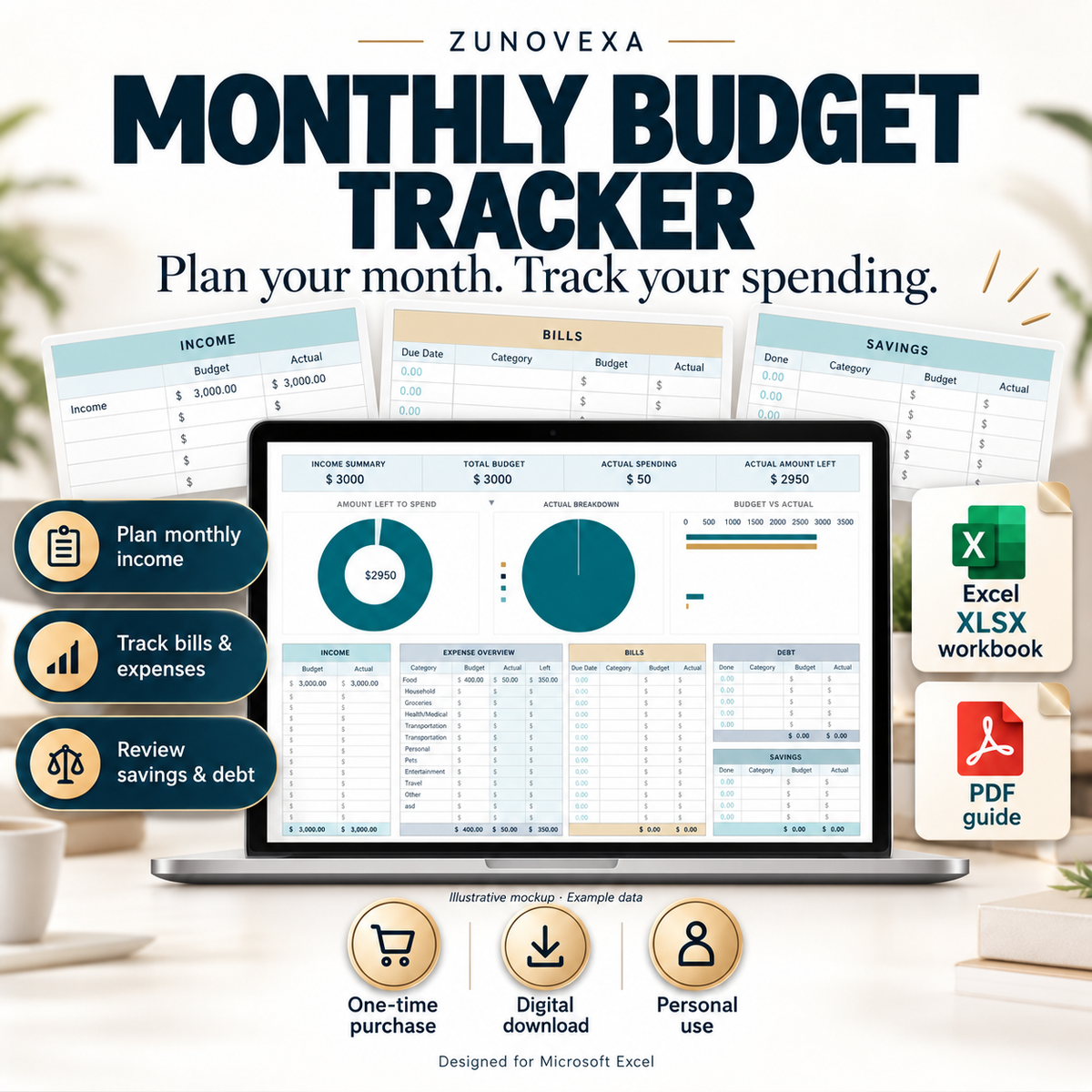
Check the software guidance before purchasing. Read our refund policy.
Product previews of the included digital workbook.

No. This is a digital download. You receive the files after confirmed payment; nothing is shipped.
An XLSX workbook with READ ME (SETUP) and Budget tabs, and an introductory PDF guide.
Microsoft Excel is recommended and may require a licence. Other apps may alter formatting, dropdowns or visual elements.
A laptop or desktop is recommended for entering and reviewing your budget. Smaller screens and mobile spreadsheet apps can make editing more difficult and may display the layout differently.
You can adapt category labels and the currency symbol following the instructions. A symbol change does not convert amounts. Keep formula cells intact.
No. Enter your income and expenses manually. The workbook calculations use the figures you provide.
No tracker subscription. This is a one-time purchase for personal use. Any separate software licence is not included.
Open the workbook and read READ ME (SETUP), then enter your figures in the Budget tab.
Contact Zunovexa with your order information. Please also review our refund policy before buying.
Reviews from Zunovexa customers.
Plan $400 for food, then record a $50 grocery purchase. The workbook updates the actual spending and the amount left automatically.


With $200 to start, $3,000 income, $1,000 rent and $200 savings, the new expense takes the available balance from $2,000 to $1,950.

Actual screenshots from the XLSX workbook opened in Google Sheets, using fictional example data. Microsoft Excel is recommended; display and controls may differ between spreadsheet apps. Tap an image for the full-size view.
Set category budgets and see actual spending alongside the amount left.
Organize income, bills, debt payments and savings in the Budget tab.
Use the dated expense log with amounts, categories and notes.
Use the summary and charts to see where money goes and what remains.
After payment confirmation, download the XLSX workbook and introductory PDF guide.
Save an untouched original. Open a working copy in Excel, read READ ME (SETUP), then set your month, starting balance and currency symbol.
Set budgets, record expenses and review the totals. Keep a separate working copy for each month.
A digital XLSX workbook with READ ME (SETUP) and Budget tabs, plus an introductory PDF guide. There is no physical delivery.
Microsoft Excel is recommended and is not included. Other spreadsheet apps may change charts, dropdowns, checkbox behaviour and formatting. A computer is recommended for setup.
No. You enter amounts manually. Budget totals and charts use the values recorded in the workbook.
You can change the displayed currency symbol. This does not convert amounts or apply an exchange rate.
Contact Zunovexa for access or setup questions. See our refund policy.
XLSX workbook + PDF guide · One-time purchase · Personal use
$2.36 USD
Digital download after payment confirmation.
Questions? Contact Zunovexa